Direct Reports List
This widget will only have content for Managers (a person who has at least one direct report in the LMS). It displays a list of their direct reports, and gives the manager access to the Training Plan, Training History, Performance Plan and talent profiles of their direct reports. Not all of these items may be available, depending on system configuration. This list can optionally show up to three levels of hierarchy.
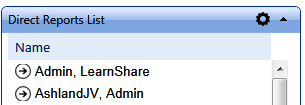
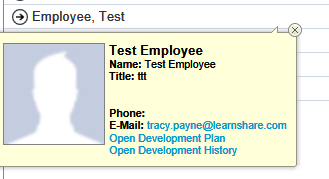
The manager can click on the arrow beside a user's name to expand the user profile.
Settings
This widget has a variety of customizable settings.
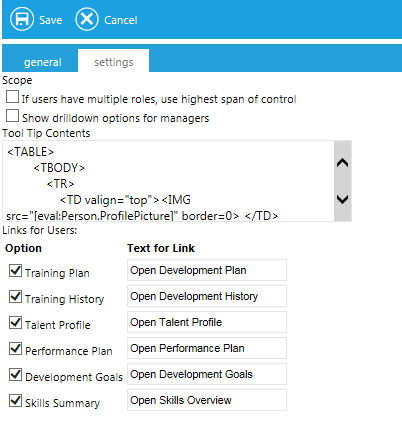
- Multiple Roles checkbox
- Select this checkbox to allow users with other LMS administrative roles to see this information for all users within their security authorization. Remember that checking this box could make the list extremely long for some LMS administrators.
- Show drilldown options for managers
- Select this checkbox for managers to have the option to see users downstream within their hierarchy. The manger can click on the plus sign to the right of any of their direct reports to view that person’s direct reports.
- Tool Tip
- The default tool tip will display when hovering over a name. If you would like to change the default, you may do so here.
- Links for Users
- Select the checkbox for each link that should be visible for each user, and enter the link text.
The options listed will vary based on your system’s configuration.
Related
Announcements
My Messages
To Do List
Term Cloud
Rich Text / HTML
Poll
Featured Courses
Featured Course Status
Manager Required Courses
Manager News Feed
Recently Run Reports